Your supplier says the invoice never arrived. Your own inbox shows a bounce, or nothing at all. The mail left your office fine, and then the receiving server decided it should not reach the inbox.
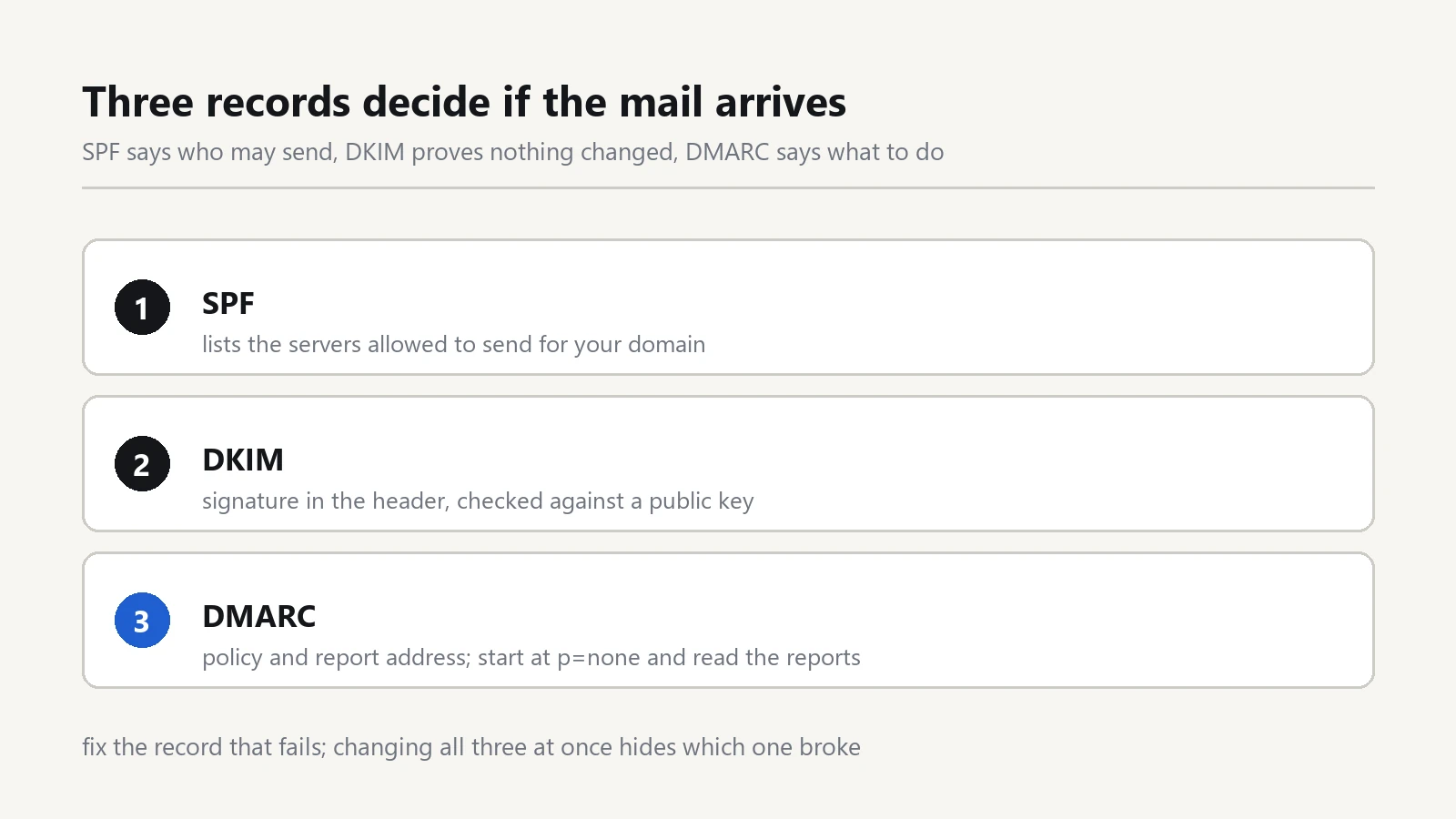
Three DNS records carry that decision: SPF, DKIM and DMARC. Each one answers a different question about your domain. When one record is missing or holds a typo, mail still leaves the office, yet it lands in spam or comes back. The SPF/DKIM/DMARC chain below runs in the order that finds the broken record fastest.
What each record actually does
SPF sits in a TXT record on the domain. It holds a list of servers that may send mail as you, plus a closing rule for every other sender. The receiving server takes the IP of the connection and looks for it in that list.
DKIM adds a signature to each outgoing message. Your domain publishes the matching public key in DNS, and that signature covers the body. A change in transit therefore breaks the check.
DMARC ties the two together. It tells a receiving server what to do when either check fails, and where to send a report about the failure.
Read the bounce message first
Open the failure notice before you touch any DNS. A bounce that names SPF points at one record. One that mentions a missing signature points at DKIM. However, a note about delayed delivery often means the receiver distrusts your sending IP, and no record edit fixes that.
Then ask who sends the mail. A newsletter sent through an outside tool leaves the vendor's servers, so those servers need a line in your SPF record too. A single failing sender on an otherwise healthy domain usually ends here.
Check the SPF record line by line
Run a TXT lookup from any office machine. On Windows, open a command prompt and type nslookup -type=txt yourdomain.com. On a Mac, type dig TXT yourdomain.com.
The answer begins with v=spf1, and you read three things inside it. First, the SPF record must exist exactly once, because two of them cancel each other out. Second, the text should end with -all for a hard fail or ~all for a soft fail. Third, count the entries that trigger extra DNS lookups, such as include: and a:. A domain may spend ten of those lookups, and the eleventh breaks the record.
When a vendor asks for their block, paste it before the closing rule. Then recheck the count, because a repair for one sender can break another.
Find the selector in a DKIM signature
Send a test message to a mailbox you control, open the full header, and look for a line that starts with DKIM-Signature. It carries a short tag such as s=selector1.
The public key then lives under a fixed name: that selector, ._domainkey., and your domain. So selector1._domainkey.yourdomain.com must return a TXT record starting with v=DKIM1. An empty answer means the sending side signs with a key that nobody can verify, so the receiver treats the message as unauthenticated.
Keep a note of the selector you use. Two senders with two selectors is normal, but a selector nobody remembers points at a server you retired long ago.
Publish the DMARC policy in stages
DMARC is one TXT record at _dmarc.yourdomain.com, and the field p= holds the policy. Begin with p=none. That value changes nothing yet, but it starts the reporting.
Read the aggregate reports for a few weeks. They arrive as XML, so use a free reader unless you enjoy spreadsheets. Look for legitimate senders that still fail, such as an old scanner, a booking system, or an invoice tool that nobody told you about.
Next, move the DMARC policy to p=quarantine and wait again. Finally, set p=reject once the reports list only senders you recognise. A jump straight to reject on a domain with unknown senders will cost you real mail.
One rule trips people up: the domain in the From header must match a domain that passed SPF or DKIM. A vendor may pass SPF with their own domain while your From header still shows yours. That mismatch fails DMARC even though both records look correct.
Fix one record, then wait out the TTL
Change one record per step, and write down the time. A TXT record with a TTL of 3600 stays cached at resolvers for up to an hour, so a test five minutes later proves nothing. Lower the TTL to 300 a day before a planned change, and raise it again after the test passes.
Keep a written copy of every record in a shared note. A record edited by two people at once, each pasting a different vendor block, is a reliable way to break a working domain.
Then run the whole SPF/DKIM/DMARC check once more from a second mailbox, because one provider may cache longer than another.
Where an SPF/DKIM/DMARC setup still breaks
Forwarding is the classic case. A staff member forwards mail from an old address, and the forwarder rewrites the envelope while leaving your header alone. The message then fails the check at the final mailbox.
Aliases behave better than forwards, because the mailbox stays on your own server. If you must forward, accept that some mail will fail and write the address down in the note.
Mailing lists and ticketing systems also rewrite headers. Ask each vendor for their recommended block, and recheck the lookup count after every addition.
Two habits that keep the chain clean
First, test after every change the way a customer would. Send from an office account to an outside mailbox, open the header, and confirm that each of the three checks reports a pass.
Second, treat email authentication as part of the same job as access control. Our notes on the first 60 minutes after a ransomware alert and on guest Wi-Fi without exposing shared files both start from one question: who can reach which account.
That question continues on the login side. The note on a password manager and MFA for office staff covers the vault behind each mailbox, and the IT offboarding checklist lists the senders to remove when a mailbox closes.
Then put the mail archive inside the backup plan, not beside it. The 3-2-1 backup guide covers the copy that survives a dead disk. The same checklist mindset helps when a shared printer disappears after a Windows update, since both jobs reward a written order of steps.
A domain with clean SPF, DKIM and DMARC records gives a receiving server a reason to trust your mail, and the repair takes an afternoon rather than a purchase order.