A screen full of file extensions you did not install, a note demanding payment, folders that will not open: the first minute after a ransomware alert is the one that decides how much you lose. The instinct to shut the computer down and call someone is understandable, and it is the wrong order.
What a ransomware alert looks like in a small office
This is the sequence worth following in a small office, written for the person who happens to be there, not for a security team that does not exist.
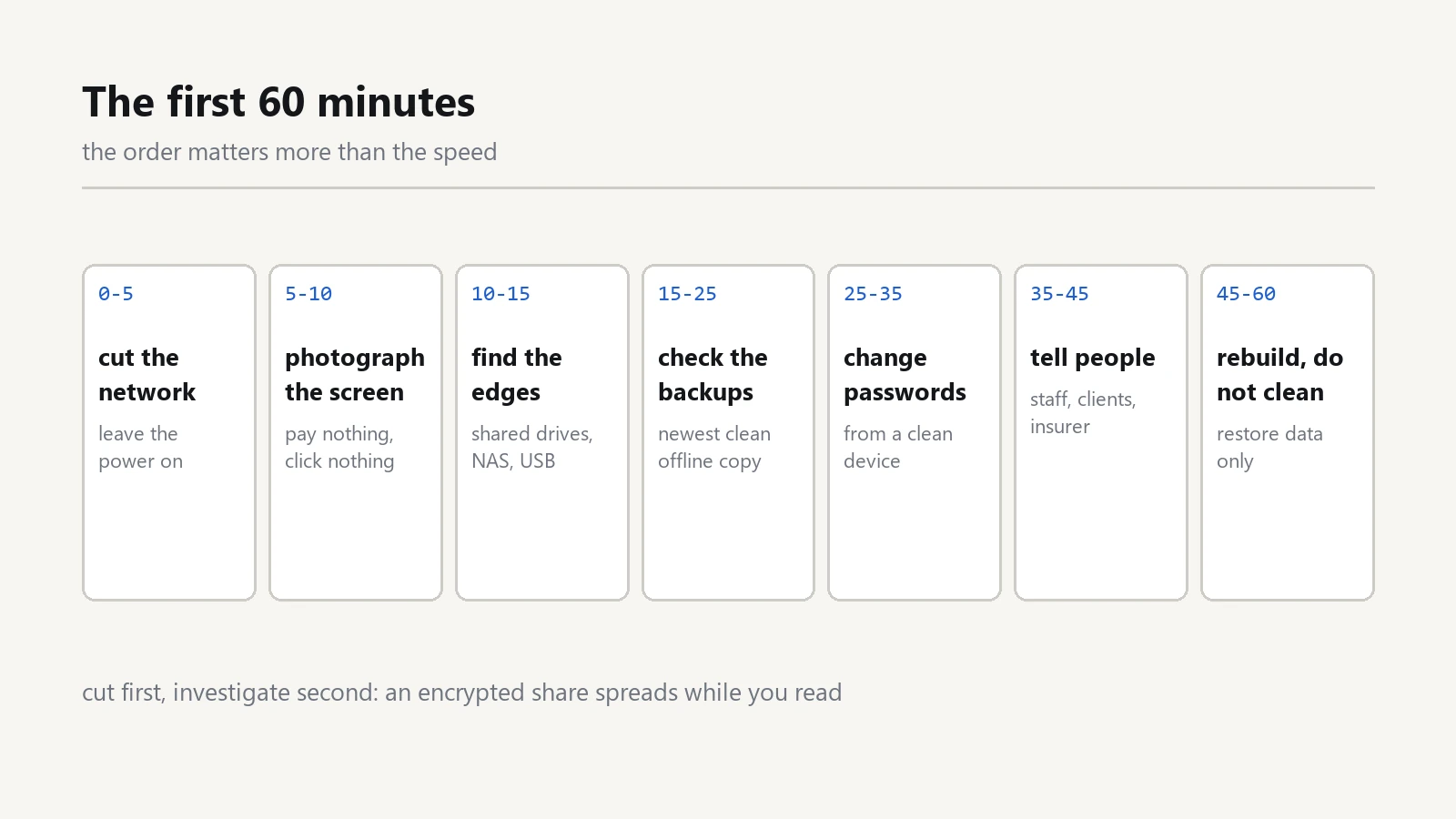
Minute 0 to 5: cut the network, leave the power on
Pull the network cable out of the back of the machine. If it is on Wi-Fi, turn the wireless off, or switch off the access point it is connected to. Ransomware spreads through whatever it can reach, so the first job is to remove its reach.
Do not shut the computer down and do not restart it. Modern ransomware encrypts in the background; a powered-off machine may keep files locked in a half-finished state, and the recovery tools that look for keys in memory need the machine running. Leave it on, disconnected, and cover the screen if you have to step away.
Minute 5 to 10: write down what you see
Photograph the screen with your phone. Note the time, the file names that changed, and the extension added to them. This record matters later for the insurer, for a technician, and for working out how it arrived.
Do not click anything in the ransom note. Do not open the link, do not send an email to the address it gives, and do not pay. Payment is not a recovery plan: it funds the next attack, and a meaningful share of victims who pay never receive a working key.
Minute 10 to 15: find the edges
Assume the infected machine touched more than itself. Walk the office and disconnect from the network, one by one:
- Every computer that shares a folder with the infected one.
- The network drive or NAS that was mapped on it.
- The printer or scanner with a shared folder, which is a classic hiding place.
- Any external drive plugged into the affected machine.
Write down what you disconnected and when. If the office has a managed switch or a router with per-port control, unplugging the uplink is faster than pulling cables from twenty desks.
Minute 15 to 25: check the backups before anything else
This is the step that decides whether the next week is a bad memory or a catastrophe. Find the most recent backup that was not connected to the network when the attack happened.
- A USB drive that was plugged in is probably encrypted too. Check it before trusting it.
- A cloud backup that syncs automatically may have synced the encrypted files over the good ones. Look for version history, not just the latest state.
- An offline copy, a tape, or a second drive kept in another room or another building is the one that survives.
Write down the date of the newest clean backup you can find. Everything after minute 25 is built on that answer. If the answer is "there is none", say so early and clearly: it changes the plan from restore to rebuild. The 3-2-1 rule exists exactly for this moment.
Minute 25 to 35: change passwords from a clean device
Use a phone or a computer that was never on the office network for this. In order:
- Email accounts, starting with the one that can reset everything else.
- Banking and payment accounts.
- Cloud storage, accounting software, and anything with client data.
- The router and any admin panel, from a device you trust.
Where the service offers it, sign out all other sessions, so a session stolen before the attack cannot be reused. Turn on two-factor authentication as you go, not later. If a password was stored in a browser on the infected machine, treat it as public.
Minute 35 to 45: tell the people who need to know
Ransomware is not only a technical event. In most places you are expected to inform someone, and the clock may start the moment you know:
- Your staff, briefly: do not open attachments, do not use the office network, do not plug in drives.
- Clients whose data was on the affected machine. This is uncomfortable and usually legally required.
- Your insurer, if you have cyber cover; most policies have a notification window and an approved list of helpers.
- A professional, if servers are encrypted, if there is no clean backup, or if client data is involved.
Keep one person as the contact point. Five people calling five different technicians produces five conflicting plans.
Minute 45 to 60: decide rebuild, do not "clean"
Once the network is contained, the honest choice is between restoring from a clean backup and rebuilding the affected machines. What is not on the list is running a cleaner on the infected computer and continuing to use it.
- Reinstall the operating system on the affected machine. Do not restore the whole system image if you cannot prove it is clean; restore data files only.
- Patch the fresh installation before reconnecting it to the network.
- Change the local administrator password, and do not reuse the one from before.
- Reconnect machines one at a time, checking them as they come back.
Then find out how it got in
Rebuilding without the cause means waiting for the second attack. In small offices the route is almost always one of five:
- An attachment or link in an email that looked like an invoice.
- Remote desktop exposed to the internet with a weak password.
- A pirated program or a cracked licence file.
- A reused password that already appeared in another breach.
- Old firmware on a plugin or a device nobody updated.
Whatever you find, three changes stop most repeats: two-factor authentication on email and remote access, no remote desktop open to the internet, and one backup copy that is offline and disconnected when it is not in use.
The one-page version for the wall
- Disconnect the network cable, leave the power on.
- Photograph the screen, click nothing, pay nothing.
- Disconnect shared drives, the NAS and external disks.
- Find the newest clean, offline backup and write down its date.
- Change email, banking and admin passwords from a clean device.
- Tell staff, affected clients, your insurer and one technician.
- Rebuild the machine, then restore data only.
- Close the route it came in through.
A ransomware alert rarely arrives as an alarm. Usually it is a colleague walking over to say that the invoices will not open. That is why the list belongs on the wall and not in a folder.
Print that list and keep it where the person on duty can find it. Under pressure nobody remembers an eight-step plan they read once; they read the page on the wall.
The rest of the office setup, including backups and network basics, is collected in the software section.