Most small offices do not lose data because a disk fails. They lose it because the only copy of the invoices, the payroll spreadsheet and the client folder lived on one desktop, and nobody noticed the drive had been clicking for a month.
The 3-2-1 rule is the oldest, least fashionable and most reliable answer to that problem. A 3-2-1 backup plan costs less than a single day of downtime, and it survives a dead drive, a stolen laptop, ransomware and one careless delete.
What a 3-2-1 backup plan actually means
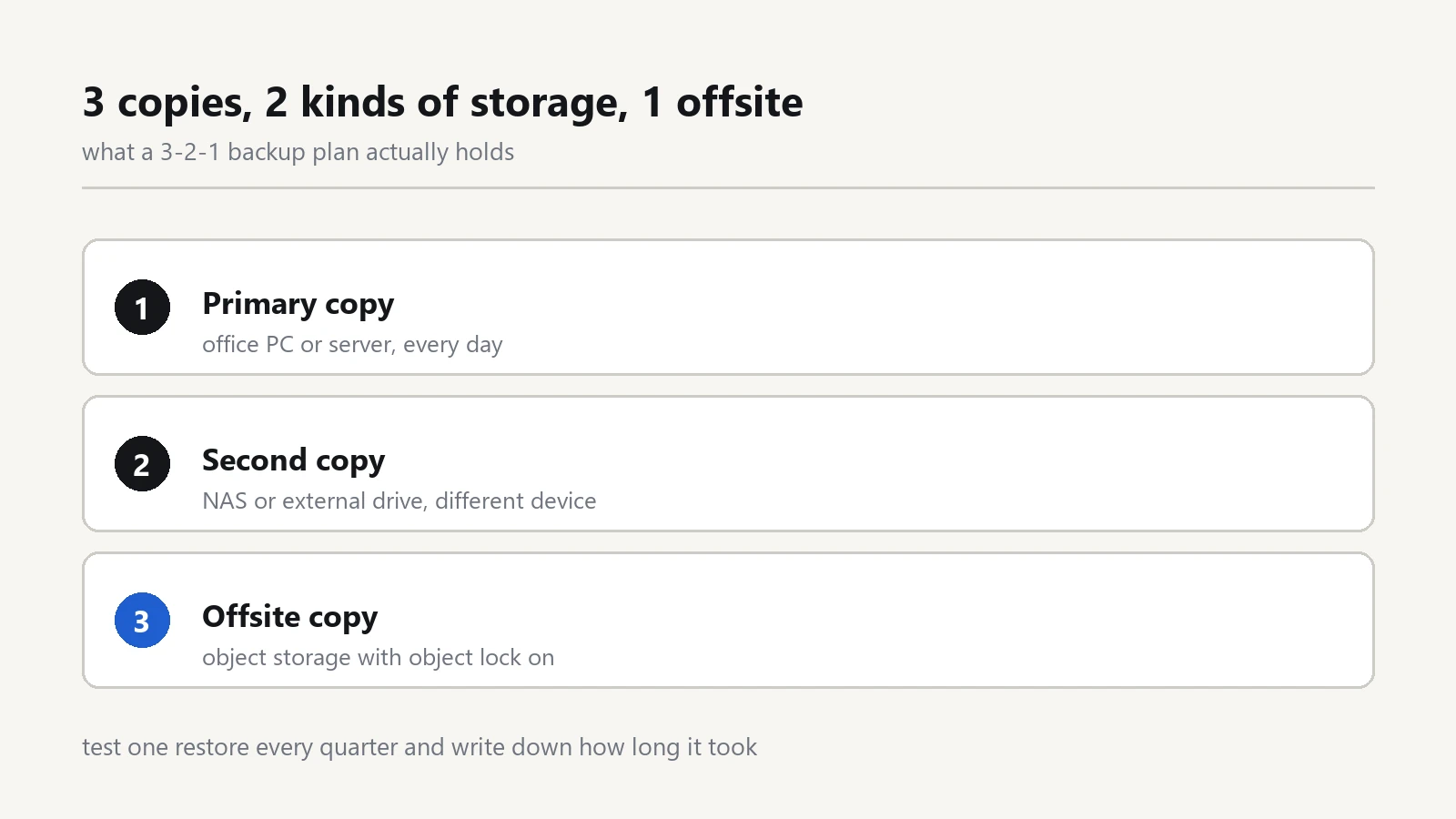
A 3-2-1 backup plan is simple: three copies, two kinds of storage, one kept elsewhere.
- 3 copies. The working file plus two backups. Not one. The moment you edit a file, a "backup" that sits on the same disk as the original is already out of date.
- 2 media. For example a network drive in the office plus cloud object storage, or an external SSD plus a second drive you take home.
- 1 offsite. Somewhere a fire, a flood, a burglar or a stolen bag cannot reach at the same moment as the original.
Many IT teams now write it as 3-2-1-1-0: one copy offline or immutable, and zero errors found when a restore is actually tested. Those last two digits are the part that separates a plan from wishful thinking.
Step 1: list what you cannot rebuild
Not every file deserves a backup. A company profile PDF, a stock photo folder or a press kit can be downloaded again. What cannot be recreated is the accounting file, the customer database, signed contracts, the mail archive, the source files behind your website, and the spreadsheet that only one person understands.
Write that list down on one page. If you cannot name the folders, the backup job will either copy everything and finish too late, or copy the wrong things and finish happily.
Step 2: keep the first copy on a different device
The first backup should run automatically at least once a day, without anyone remembering to click anything. Every operating system already ships with the tool:
- Windows: File History writes versions to an external drive, and OneDrive can keep the Desktop, Documents and Pictures folders synced.
- macOS: Time Machine keeps hourly local snapshots and copies to an external disk or a network drive.
- Linux servers: restic or Borg to a local repository, scheduled with a timer.
Set it once, then check the notification area every Monday. A backup job that silently stopped three weeks ago looks exactly like a backup job that works.
Step 3: send the second copy offsite
This is the step most offices skip, and the one that decides whether a fire is an inconvenience or the end of the company. There are three practical options:
- Cloud object storage such as Backblaze B2, Wasabi, Amazon S3 or Cloudflare R2, written to by restic, rclone, Duplicati or the backup agent your NAS provides.
- A second NAS at another office or at the owner's home, synced overnight.
- Rotating external drives carried home on Friday and swapped the following Monday. Free, but only survives if the habit survives.
The first upload is always slow. Throttle it and let it run for a week rather than cancelling it because the office internet felt sluggish for one afternoon.
Step 4: keep one copy out of reach
Ransomware encrypts everything it can open: mapped network drives, mounted shares, connected USB disks. A backup that is permanently mounted is not a backup, it is a second victim.
Keep one copy where an infected machine cannot write: an external drive that is disconnected when the job finishes, a NAS snapshot on read-only storage, or an object storage bucket with object lock switched on. If the copy cannot be modified, it cannot be encrypted.
Step 5: test a restore, and time it
Every quarter, pick a file at random, restore it into a different folder, open it, and write down how long the whole thing took. That number, not the one in a sales brochure, is your real recovery time.
Restore one database too, at least once a year, on a machine that is not the production server. A backup that has never been restored is a hope with a file extension.
A stack that fits a 5 to 20 person office
- Local: File History or Time Machine on every laptop, to an external drive that stays in the office.
- Network: a NAS with snapshots for the shared folder, so a deleted file can be pulled back from last Tuesday.
- Offsite: the same NAS pushing an encrypted copy to object storage every night, or a free agent such as Veeam Agent for Microsoft Windows writing to a remote repository.
- Offline: one drive per month, rotated, sitting in a drawer away from the office.
None of this requires an enterprise contract. It requires one person, one schedule and one checklist.
Five mistakes that quietly break the plan
- The backup drive is mapped as a letter, so ransomware encrypts the backups first.
- Only the server is backed up, while the real work happens on laptops.
- Version history is too short: seven daily copies cannot rescue you from a corrupted file that nobody noticed for nine days.
- One person knows the encryption password, and that person is on holiday.
- Nobody has ever restored anything, so nobody knows the archive is incomplete.
What to write in the runbook
- Who owns the backup, and who replaces them when they are away.
- What is copied, how often, and how many versions are kept.
- Where the encryption password lives, in a password manager and in a sealed envelope.
- The restore order: accounting first, then mail, then the website, then everything else.
- The phone number of the person who performs the restore, written on paper.
Software choices matter far less than this page. A plain external drive with a written schedule beats an expensive appliance that nobody checks. If you only do one thing this week, buy a second drive, plug it in on Friday and take it home. That single habit already covers two of the three copies.
Once the file layer is stable, the next question is who can reach it. Our notes on office security systems cover access control, and the software section collects the tools mentioned above.